自定义js 处添加代码。
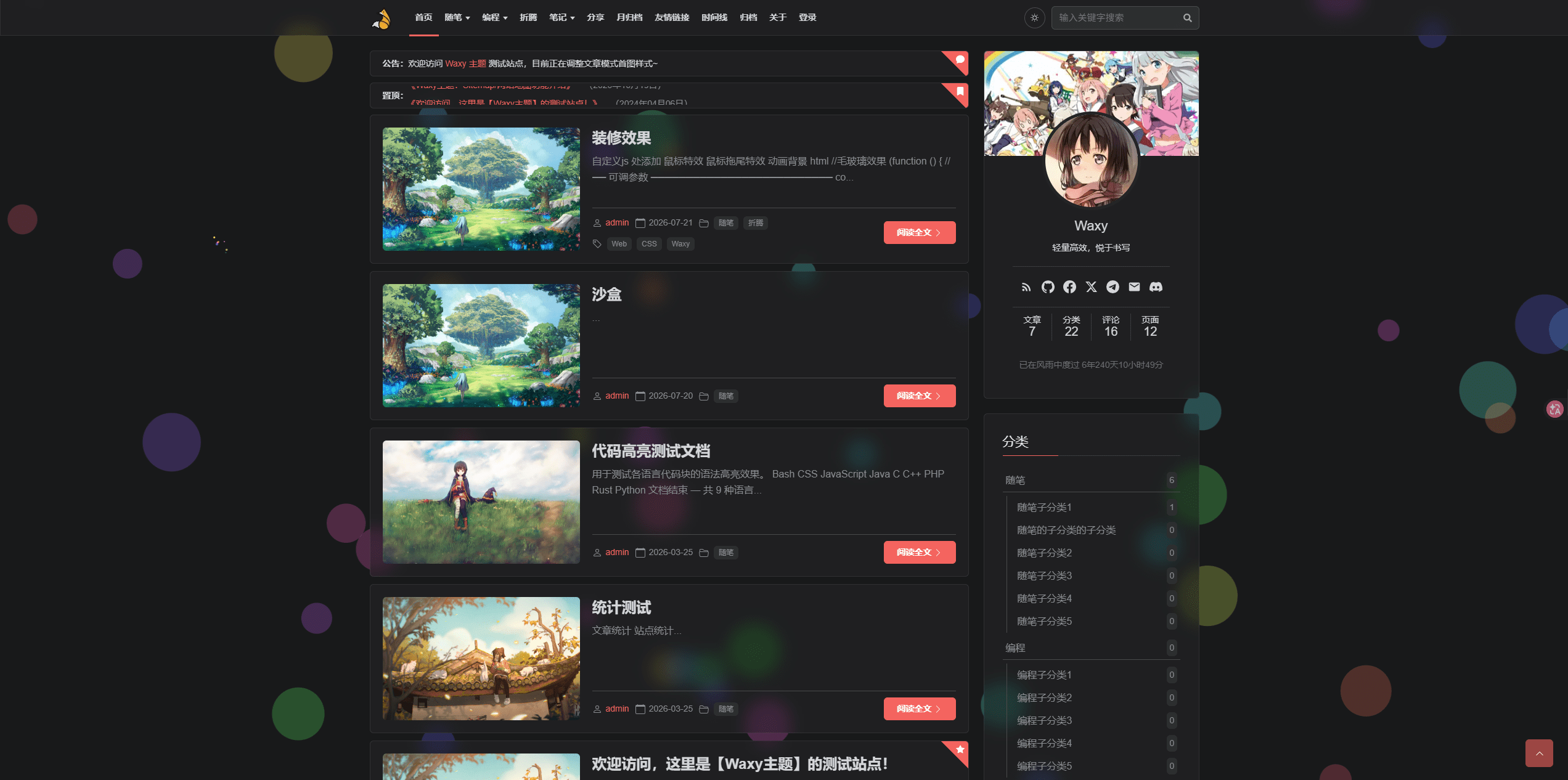 效果
效果鼠标特效
// 鼠标特效
(function () {
  // 内部独立的 Canvas,只管点击烟花
  const clickCanvas = document.createElement('canvas');
  const ctx = clickCanvas.getContext('2d');
  document.body.appendChild(clickCanvas);

  clickCanvas.style.cssText = 'position:fixed;top:0;left:0;pointer-events:none;z-index:9999;width:100%;height:100%;';

  let particles = [];
  const MAX_PARTICLES = 300;

  function resize() {
    clickCanvas.width = window.innerWidth;
    clickCanvas.height = window.innerHeight;
  }
  window.addEventListener('resize', resize);
  resize();

  class Particle {
    constructor(x, y) {
      this.x = x;
      this.y = y;
      this.size = Math.random() * 3 + 2;
      const angle = Math.random() * Math.PI * 2;
      const speed = Math.random() * 5 + 2;
      this.speedX = Math.cos(angle) * speed;
      this.speedY = Math.sin(angle) * speed - 1;
      this.gravity = 0.15;
      this.color = `hsl(${Math.random() * 360}, 100%, 60%)`;
      this.alpha = 1;
      this.decay = Math.random() * 0.015 + 0.015;
    }
    update() {
      this.speedY += this.gravity;
      this.x += this.speedX;
      this.y += this.speedY;
      this.alpha -= this.decay;
    }
    draw() {
      ctx.save();
      ctx.globalAlpha = this.alpha;
      ctx.beginPath();
      ctx.arc(this.x, this.y, this.size, 0, Math.PI * 2);
      ctx.fillStyle = this.color;
      ctx.fill();
      ctx.restore();
    }
  }

  window.addEventListener('click', (e) => {
    if (particles.length > MAX_PARTICLES) {
      particles.splice(0, 30);
    }
    for (let i = 0; i < 25; i++) {
      particles.push(new Particle(e.clientX, e.clientY));
    }
  });

  function animate() {
    ctx.clearRect(0, 0, clickCanvas.width, clickCanvas.height);
    particles = particles.filter(p => p.alpha > 0);
    particles.forEach(p => {
      p.update();
      p.draw();
    });
    requestAnimationFrame(animate);
  }
  animate();
})();
鼠标拖尾特效
// 鼠标拖尾特效
(function () {
  const canvas = document.createElement('canvas');
  const ctx = canvas.getContext('2d');
  document.body.appendChild(canvas);

  // 基础样式:穿透、全屏、置顶
  canvas.style.cssText = 'position:fixed;top:0;left:0;pointer-events:none;z-index:9999;width:100%;height:100%;';

  function resize() {
    canvas.width = window.innerWidth;
    canvas.height = window.innerHeight;
  }
  window.addEventListener('resize', resize);
  resize();

  let trailPoints = []; // 彗星主轨迹点
  let starDusts = [];   // 剥离的彗尾星尘微粒
  const MAX_POINTS = 35; // 轨迹长度(决定彗尾的长度)

  // 获取随机七彩颜色
  function getRandomColor() {
    return `hsl(${Math.floor(Math.random() * 360)}, 95%, 65%)`;
  }

  // 1. 监听鼠标移动(生成彗星核心轨迹)
  window.addEventListener('mousemove', (e) => {
    trailPoints.push({
      x: e.clientX,
      y: e.clientY,
      color: getRandomColor()
    });

    // 限制主轨迹长度,保证彗尾自然收束
    if (trailPoints.length > MAX_POINTS) {
      trailPoints.shift();
    }

    // 移动时,高概率从头部剥离出散落的星尘微粒
    if (Math.random() > 0.3) {
      starDusts.push({
        x: e.clientX + (Math.random() - 0.5) * 6,
        y: e.clientY + (Math.random() - 0.5) * 6,
        vx: (Math.random() - 0.5) * 1.5,
        vy: (Math.random() - 0.5) * 1.5 + 0.5, // 带有微弱的下落惯性
        size: Math.random() * 2.5 + 1,
        color: getRandomColor(),
        alpha: 1,
        decay: Math.random() * 0.02 + 0.02
      });
    }
  });

  // 2. 监听鼠标点击(彗星爆发:瞬间向四周溅射大量细小星尘)
  window.addEventListener('click', (e) => {
    for (let i = 0; i < 30; i++) {
      const angle = Math.random() * Math.PI * 2;
      const speed = Math.random() * 4 + 1;
      starDusts.push({
        x: e.clientX,
        y: e.clientY,
        vx: Math.cos(angle) * speed,
        vy: Math.sin(angle) * speed,
        size: Math.random() * 3 + 1,
        color: getRandomColor(),
        alpha: 1,
        decay: Math.random() * 0.03 + 0.015
      });
    }
  });

  // 3. 核心动画渲染循环
  function animate() {
    ctx.clearRect(0, 0, canvas.width, canvas.height);

    // 【第一部分:绘制彗星主体及渐细彗尾】
    if (trailPoints.length > 1) {
      for (let i = 1; i < trailPoints.length; i++) {
        const p1 = trailPoints[i - 1];
        const p2 = trailPoints[i];

        // 核心算法:通过索引计算出当前点在彗星中的位置比例
        // 头部(靠近数组末尾)最粗最亮,尾部(靠近数组开头)最细最暗
        const ratio = i / trailPoints.length;
        const lineWidth = ratio * 10; // 彗头最大粗细为 10px
        const alpha = ratio * 0.8;    // 彗头最大透明度为 0.8

        ctx.save();
        ctx.globalAlpha = alpha;
        ctx.strokeStyle = p2.color;
        ctx.lineWidth = lineWidth;
        ctx.lineCap = 'round';
        ctx.lineJoin = 'round';

        ctx.beginPath();
        ctx.moveTo(p1.x, p1.y);
        ctx.lineTo(p2.x, p2.y);
        ctx.stroke();
        ctx.restore();
      }
    }

    // 【第二部分:绘制并更新剥离出来的星尘碎屑】
    starDusts = starDusts.filter(d => d.alpha > 0);
    starDusts.forEach(d => {
      d.x += d.vx;
      d.y += d.vy;
      d.alpha -= d.decay; // 碎屑独立淡出
      d.size *= 0.97;     // 碎屑逐渐变小

      ctx.save();
      ctx.globalAlpha = d.alpha;
      ctx.fillStyle = d.color;
      ctx.beginPath();
      ctx.arc(d.x, d.y, d.size, 0, Math.PI * 2);
      ctx.fill();
      ctx.restore();
    });

    // 主轨迹衰减(当鼠标不动时,彗星尾巴会自己缩进并消失)
    if (trailPoints.length > 0 && Math.random() > 0.2) {
      trailPoints.shift();
    }

    requestAnimationFrame(animate);
  }

  animate();
})();
动画背景
// 动画背景
(function () {
  // 创建背景专用 Canvas
  const bgCanvas = document.createElement('canvas');
  const ctx = bgCanvas.getContext('2d');
  document.body.appendChild(bgCanvas);

  // background: transparent 确保完全透明,完美适应任何网页主题
  bgCanvas.style.cssText = 'position:fixed;top:0;left:0;z-index:-1;width:100%;height:100%;background:transparent;pointer-events:none;';

  function resize() {
    bgCanvas.width = window.innerWidth;
    bgCanvas.height = window.innerHeight;
  }
  window.addEventListener('resize', resize);
  resize();

  let bubbles = [];
  const BUBBLE_COUNT = 45; // 气泡数量,可根据需要增减

  class Bubble {
    constructor() {
      this.init(true); // 首次初始化,随机散落在屏幕各处
    }

    init(isFirstTime = false) {
      this.radius = Math.random() * 35 + 15; // 气泡半径(15px 到 50px)
      this.x = Math.random() * bgCanvas.width;

      // 首次随机分布全屏,后续则严格从底部(屏幕高度 + 半径)升起
      this.y = isFirstTime ? Math.random() * bgCanvas.height : bgCanvas.height + this.radius;

      this.vy = -(Math.random() * 0.7 + 0.3); // 上升速度
      this.wobbleSpeed = Math.random() * 0.02; // 左右摇摆频率
      this.wobble = Math.random() * Math.PI; // 初始摇摆弧度

      // 七彩随机色:HSL 色相(0~360) 完美覆盖彩虹色系
      // 饱和度 85%(色彩鲜艳)、亮度 65%(柔和不刺眼)、透明度 0.25(半透明,可完美叠在任何主题上)
      this.color = `hsla(${Math.floor(Math.random() * 360)}, 85%, 65%, 0.25)`;
    }

    update() {
      this.y += this.vy;
      this.wobble += this.wobbleSpeed;
      this.x += Math.sin(this.wobble) * 0.4; // 模拟水流左右晃动

      // 飘出顶部后,重置回底部重新生成新气泡
      if (this.y < -this.radius) {
        this.init(false);
      }
    }

    draw() {
      ctx.beginPath();
      ctx.arc(this.x, this.y, this.radius, 0, Math.PI * 2);
      ctx.fillStyle = this.color;
      ctx.fill();
    }
  }

  // 初始化气泡
  for (let i = 0; i < BUBBLE_COUNT; i++) {
    bubbles.push(new Bubble());
  }

  // 统一渲染循环
  function animate() {
    // 每一帧彻底清空画布,保持透明度
    ctx.clearRect(0, 0, bgCanvas.width, bgCanvas.height);

    bubbles.forEach(b => {
      b.update();
      b.draw();
    });

    requestAnimationFrame(animate);
  }

  animate();
})();
毛玻璃效果
//毛玻璃效果
(function () {
  // ── 可调参数 ──────────────────────────
  const BLUR      = 12;    // 模糊半径 px,越大越"磨砂"
  const SATURATE  = 150;   // 提色 %,玻璃后面颜色更鲜活
  const ALPHA_L   = 0.25;  // 浅色模式背景不透明度(越小越透)
  const ALPHA_D   = 0.55;  // 暗色模式背景不透明度
  // ─────────────────────────────────────

  // 需要毛玻璃的容器(与原主题真实类名一致)
  const targets = [
    '.site-header', '.nav__sub',
    '.post', '.sidebar .widget',
    '.widget--toc', '.widget--toc.is-fixed', '.waxy-toc-float-panel',
    '.blog-stats__item', '.post-stats__item',
    '.about-author', '.empty-state',
    '.post-nav__item', '.breadcrumb',
    '.waxy-drawer__nav', '.page-404__card'
  ].join(',\n');

  const css = `
/* ── 毛玻璃质感覆盖(外挂,不改原文件)───────── */
${targets} {
  /* 半透明底色,让 backdrop-filter 有东西可透 */
  background: rgba(255, 255, 255, ${ALPHA_L}) !important;
  -webkit-backdrop-filter: blur(${BLUR}px) saturate(${SATURATE}%);
  backdrop-filter: blur(${BLUR}px) saturate(${SATURATE}%);
  /* 顶部一条极淡高光,模拟玻璃边缘反光 */
  border: 1px solid rgba(255, 255, 255, 0.45);
}

/* 暗色模式:换深色半透明底 + 更弱的高光边 */
html.dark ${targets.split(',\n').join(',\nhtml.dark ')} {
  background: rgba(36, 37, 38, ${ALPHA_D}) !important;
  border: 1px solid rgba(255, 255, 255, 0.08);
}
`;

  const style = document.createElement('style');
  style.id = 'waxy-glass-override';
  style.textContent = css;
  document.head.appendChild(style);
})();
评论已关闭